

Custom Development
Alcohol Delivery Market Share and Trends: Size, Growth, & Business Opportunities
7 Apr 2026
According to Forbes Advisor, 88% of online users won’t return to a website after a bad user experience. Whether it’s a misaligned button, broken image, or unexpected layout shift, even small visual issues can significantly hurt your credibility and user retention.
You may have spent countless hours designing a perfect interface—aligning every pixel, choosing the right visuals, and ensuring a flawless flow. But what happens when an unnoticed visual bug sneaks into production? Maybe the homepage layout breaks, or the “Place Order” button disappears on mobile. These issues can disrupt user journeys and result in lost conversions.
This is where visual regression testing becomes essential. It automatically detects unintended changes in your application’s UI by comparing current visuals with a known baseline. This helps ensure consistency, even after updates or code changes.
In this article, we’ll explore how visual regression testing works, its real-world advantages, and why it should be an integral part of your web development workflow to maintain a smooth, visually stable user experience.
Visual regression testing is a special testing technique to ensure that any code changes made by a developer do not interfere with the other functionalities of the software.
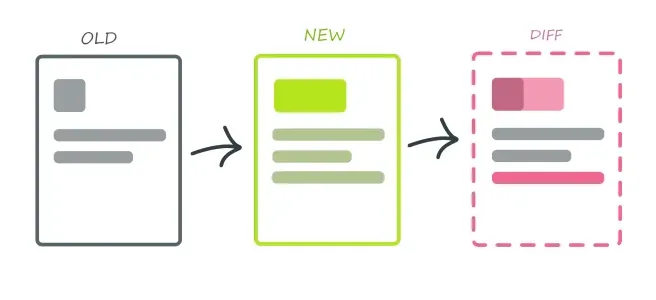
It's like taking a before-and-after photographic memory of your website to check whether the latest code has affected the primary visual interface of the application.
Visual testing is an important step in making the first impression of your software or website visually appealing to your customers.
Imagine that you are in the process of ordering food from a restaurant.
You have selected your food items and have now reached the last checkout page, only to find that the ‘Place Order’ button is hidden., and you cannot proceed any further.
As a customer, this experience could be frustrating and may reduce the likelihood of you returning to the website for future bookings.
Launching a website or software without visual regression testing can lead to a huge revenue loss. In fact, according to Forrester Research, a well-designed user interface could raise your website’s conversion rate by up to 200%, and visual bugs are a direct threat to that potential.
Let us look at the reasons why visual regression testing is indispensable:
Visual regression testing has a significant advantage in detecting unintended visual regressions that may occur due to changes made during the development process.
It plays an essential role in identifying any discrepancies in layout, styling, or graphical elements by meticulously comparing screenshots of the website before and after the changes, ensuring that your website looks the way it should.
False positives mean experiencing a false error when there's no such fault in the software or website.
These errors mostly occur when dynamic content is listed on GIFs, web pages, and animations. Such instances can be resolved with automated visual testing tools and platforms.
Through visual regression testing, you ensure the product meets the expected quality standards.
Eventually, this will lead to greater customer satisfaction and repeat business.
By detecting bugs and visual defects early, you can prevent the costly reworks that may be needed if these issues are found in the later stages of development.
There are hundreds or thousands of visual testing tools, but only a few can serve the purpose of providing efficient and reliable visual regression testing.
No worries, we have got you covered; here we've listed a few traits of the best regression testing that you should look at, including-
Choosing a visual testing tool that allows for cross-browser and cross-device visual validation is essential.
This will ensure that any differences in appearance across different devices and browsers are caught and corrected, preventing a negative visual impact on your code's deployment.
There are two distinct types of automated testing tools. The first kind requires no coding and can be used by anyone through a drag-and-drop interface or record-playback plugin.
The second type is a testing framework that allows application developers to write code for testing purposes.
The selected tool must be capable of accurately filtering false positives, spotting pixel offsets, anti-aliasing, and testing dynamic or moving content.
A great tool doesn’t live in isolation. It should plug into your CI/CD pipeline (like Jenkins, GitLab, or GitHub Actions), so visual tests run automatically whenever code changes. This saves time and helps catch UI bugs early—before they reach production.
As your UI evolves, you’ll need to update visual baselines without slowing down your workflow. A reliable tool should make this process easy, offering features like visual side-by-side comparisons, version control, and clear approval workflows. This reduces guesswork and streamlines test maintenance.
A tool is only useful if your entire team can act on its insights. Look for one that provides clear, visual diffs that are easy to interpret—even for non-developers.
Features like real-time alerts, visual dashboards, and shareable reports help teams collaborate faster and resolve issues with confidence.
If your application has a large number of components or frequent deployments, performance becomes critical.
Choose a tool designed to handle high test volumes efficiently, without adding significant delays to your development or deployment pipelines.
Like regression testing, which is indispensable to ensure that an application works well even after code changes, visual regression testing has become essential in ensuring websites and software applications maintain visual integrity. As developers and testers aim to deliver flawless digital experiences, visual regression testing serves as a proactive measure against unexpected visual defects.
By meticulously assessing the impact of code changes on the visual interface, teams can safeguard against user frustration and potential revenue loss associated with poor performance. If you’re looking for a best visual regression testing platform then TestGrid serves the purpose.
TestGrid is an AI-powered codeless automation testing platform that offers excellent visual testing capabilities that help identify UI inconsistencies, layout issues, and design regressions early in the development process.
One key benefit is that you don’t need any feature-specific tools when testing with TestGrid. All you need to do is insert a few lines of code and leave everything else to the platform’s AI. ’t It detects visual anomalies and provides actionable insights for rapid resolution, ensuring flawless user experiences across web and mobile applications.
Custom Development
7 Apr 2026
Tell us what your business actually runs on today, and we will map what it takes to make it one system.